현재 CUBRID-Python 은 지원중단 될 .egg 형식의 패키지로 빌드 배포 되게 되어 있다.
pip에서 설치된 패키지를 확인하면 아래와 같은 지원 중단 메시지가 발생한다.
DEPRECATION: Loading egg at /usr/local/lib64/python3.12/site-packages/CUBRID_Python-11.2.0.10-py3.12-linux-x86_64.egg is deprecated. pip 23.3 will enforce this behaviour change. A possible replacement is to use pip for package installation..
이를 간단하게 wheel로 패키징하여 설치하면 해당 메시지를 제거 할 수 있다.
리눅스 버전을 기반하여 설명 한다.
일단 드라이버 먼저 다운로드 한다. 상단의 DOWNLOAD 로 가면 드라이버 다운로드 링크를 확인 할 수 있다.
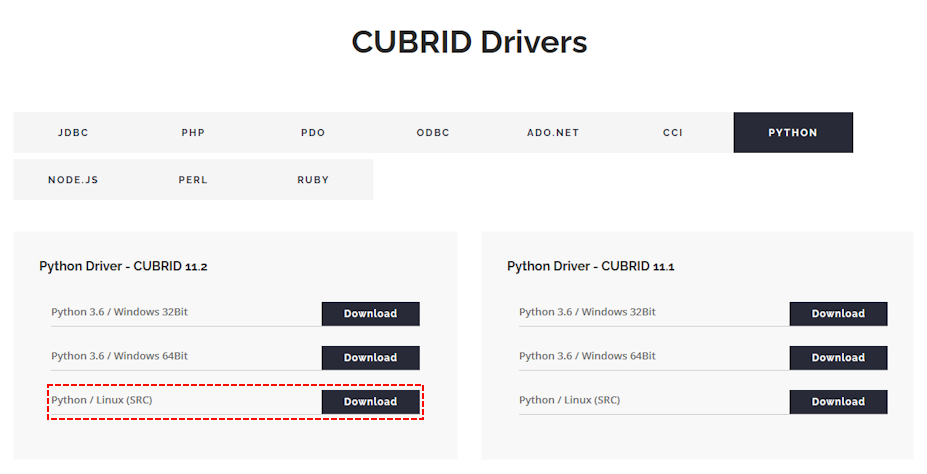
현재 CUBRID_Python 드라이버는 cci 드라이버 빌드 후 생성 하는 형식으로 되어 있어서 빌드에 필요한 라이브러리 등이 설치 되어야 한다.
$ dnf group install "Development Tools"
$ dnf install ncurses-devel python-devel
위와 같이 설치하니 빌드되는데 문제가 없었다.
나의 환경은 Rocky Linux 9.3 에 Python3.12 환경이다. 각자 자신에 맞는 환경 패키지를 설치해야 한다.
추가로 위의 경고를 제거하기 위해서는 Python wheel 패키지로 만들어야 해서
$ pip install wheel
로 빌드용 패키지를 추가로 설치 했다. 위의 모든 준비가 되었다는 가정하에 순서를 설명한다.
$ #드라이버 패키지 다운로드
$ wget https://ftp.cubrid.org/CUBRID_Drivers/Python_Driver/11.2.0/Linux/cubrid-python-11.2-latest.tar.gz
--2025-08-05 04:25:15-- https://ftp.cubrid.org/CUBRID_Drivers/Python_Driver/11.2.0/Linux/cubrid-python-11.2-latest.tar.gz
Resolving ftp.cubrid.org (ftp.cubrid.org)... 218.233.240.70
Connecting to ftp.cubrid.org (ftp.cubrid.org)|218.233.240.70|:443... connected.
HTTP request sent, awaiting response... 200 OK
Length: 28719227 (27M) [application/x-gzip]
Saving to: ‘cubrid-python-11.2-latest.tar.gz’
cubrid-python-11.2-latest.tar.gz 100%[========================================================================================================================================>] 27.39M 36.8MB/s in 0.7s
2025-08-05 04:25:16 (36.8 MB/s) - ‘cubrid-python-11.2-latest.tar.gz’ saved [28719227/28719227]
$ # 드라이버 패키지 압축해제
$ tar xvf cubrid-python-11.2-latest.tar.gz
RB-11.2.0/
RB-11.2.0/CUBRIDdb/
RB-11.2.0/CUBRIDdb/FIELD_TYPE.py
RB-11.2.0/CUBRIDdb/__init__.py
RB-11.2.0/CUBRIDdb/connections.py
RB-11.2.0/CUBRIDdb/cursors.py
... 중략 ...
RB-11.2.0/tests2/readme.md
RB-11.2.0/tests2/run-test.py
RB-11.2.0/tests2/runtest.sh
$ cd RB-11.2.0
$ # cci 드라이버 빌드
$ sh build_cci.sh
[2025-08-05 04:29:34] Entering target [build]
... 중략 ...
-- Generating done (0.0s)
-- Build files have been written to: /root/a/RB-11.2.0/cci-src/build_x86_64_release
... 중략 ...
[ 45%] Linking CXX shared library libcascci.so
[ 45%] Built target cascci
... 중략 ...
[ 90%] Linking CXX static library libcascci.a
[ 90%] Built target cascci_static
... 중략 ...
[100%] Linking CXX executable ../bin/cci_applier
[100%] Built target cci_applier
[ 45%] Built target cascci
[ 90%] Built target cascci_static
[100%] Built target cci_applier
Install the project...
-- Install configuration: "RelWithDebInfo"
... 중략 ...
[2025-08-05 04:30:03] Leaving target [build]
[2025-08-05 04:30:03] Completed
*** Summary ***
Target [build]
Version [11.2.0.0000]
Build mode [x86_64/release]
Configured with [ -DCMAKE_BUILD_TYPE=RelWithDebInfo]
이제 CUBRID-Python 드라이버를 wheel 패키지로 만들 준비가 되었다. 기존의 egg에서 wheel 로 바꾸는 것은 간단했다.
$ #드라이버 재빌드 및 wheel 패키징
$ python3.12 setup.py bdist_wheel
[2025-08-05 04:33:14] Entering target [build]
CMake Deprecation Warning at CMakeLists.txt:19 (cmake_minimum_required):
... 중략 ...
[2025-08-05 04:33:14] Leaving target [build]
[2025-08-05 04:33:14] Completed
*** Summary ***
Target [build]
Version [11.2.0.0000]
Build mode [x86_64/release]
Configured with [ -DCMAKE_BUILD_TYPE=RelWithDebInfo]
... 중략 ...
/usr/lib/python3.12/site-packages/setuptools/_distutils/cmd.py:66: SetuptoolsDeprecationWarning: setup.py install is deprecated.
!!
********************************************************************************
Please avoid running ``setup.py`` directly.
Instead, use pypa/build, pypa/installer or other
standards-based tools.
See https://blog.ganssle.io/articles/2021/10/setup-py-deprecated.html for details.
********************************************************************************
!!
self.initialize_options()
경고 메시지가 나오기는 해도 wheel 패키징에는 문제가 없다.
이제는 wheel 로 패키징한 드라이버를 설치한다. 환경에 따라서 dist 디렉터리에 패키징된 파일명은 다를수 있느니 확인하고 설치하자.
$ #wheel 패키징 드라이버 설치
$ cd dist
$ pip3.12 install CUBRID_Python-11.2.0.10-cp312-cp312-linux_x86_64.whl
Processing ./CUBRID_Python-11.2.0.10-cp312-cp312-linux_x86_64.whl
Installing collected packages: CUBRID-Python
Successfully installed CUBRID-Python-11.2.0.10
$ pip3.12 list | grep CUBRID
CUBRID-Python 11.2.0.10
이제는 pip 로 패키지 확인 할때 egg 패키지 경고가 사라진다.

 어드민 툴 오류 (Software caused connection abort: recv failed)